
Your Sigenergy system can operate in several different modes, each designed for a different goal. The mode your system runs in determines how it uses solar energy, the battery, and the grid — so it's worth understanding what each one does.
You can view and change your working mode in the mySigen app under Operational Mode.
Self-Consumption Mode
This is the most common mode for households wanting to reduce their electricity bills.
When solar is generating, your home is powered by solar first. Any excess solar charges the battery. If there's still surplus after the battery is full, it's exported to the grid. When solar isn't enough — such as in the evening or on cloudy days — the battery discharges to power your home. The grid acts as a backup when both solar and battery are depleted.
Best for: Most households. Maximises the amount of solar and battery energy you use yourself.

Time-based Control Mode
This mode lets you manually set specific windows for charging and discharging. For example, you can set the battery to charge from the grid during off-peak (cheaper) overnight periods and discharge during peak (expensive) daytime periods.
Best for: Households on a time-of-use electricity tariff who want to actively manage costs around peak and off-peak rates.


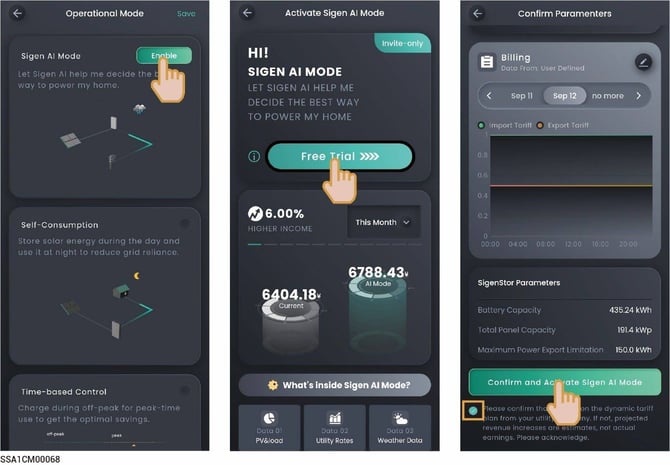
Sigen AI Mode
In this mode, the system learns your household's energy usage patterns, local electricity pricing, and weather forecasts to automatically optimise how and when it charges and discharges — without you needing to set anything manually.
Note: Sigen AI Mode is only available in supported regions. Check the mySigen app to see if it's available for your system.
Best for: Households who want smart automatic optimisation without manually configuring schedules.

Fully Fed to Grid Mode
In this mode, all solar generation is exported to the grid to maximise feed-in earnings. The battery charges when solar exceeds the inverter's output capacity, and discharges at night to maintain maximum export.
Best for: Households on a high feed-in tariff where selling solar is more valuable than self-consuming it.
Remote EMS Mode
This mode allows a third-party energy management system to control your system's parameters. Do not enter or exit this mode without confirming with your installer first.
Backup Reserve
In any mode, you can set a Backup Reserve percentage in the mySigen app. This tells the battery to stop discharging at that level while the grid is connected — reserving that charge for use during a power outage.
For example, setting a 20% Backup Reserve means the battery holds that 20% in reserve and only uses it if the grid goes down.
See our related guide: What is Backup Reserve and how do I set it?
Not sure which mode is right for you?
Email us at service@brightearthsolar.com.au and we can review your setup and tariff to recommend the best configuration.